

the collective edit
tagging

the collective edit
Who we are
Preparing to Consign with The Collective Edit
Your first step as a consignor is determining which items from your wardrobe are the right fit to sell. To do that, it’s helpful to clearly understand what The Collective Edit is—and what it is not..
The Collective Edit is
-
Designed for women who love fashion and enjoy curating a modern, stylish wardrobe.
-
Focused on name brands, current trends, and items generally purchased within the last two years.
-
Ideal for consignors who frequently update their closets, follow seasonal trends, or are influenced by new styles and fashion inspiration.
-
A great option for selling items that missed a return window or pieces you loved in theory but only wore once or twice.
-
A smart way to earn money from pieces you no longer wear—and refresh your wardrobe with new-to-you finds.
The Collective Edit is not
-
A garage sale or bulk-clearance event.
-
A good fit for dated, heavily worn, or out-of-style clothing.
-
Ideal for consignors whose wardrobes do not regularly rotate with newer pieces.
-
A solution for clearing out large quantities of long-stored clothing. Items kept in bins or totes are typically older than two years and are not a good fit for this event.
-
A suitable consigning opportunity for wardrobes primarily made up of Walmart or big-box retailer clothing. While we welcome everyone to shop, most items from these retailers are not accepted for consigning.
-
The right choice if your wardrobe consists mainly of clothing worn consistently for five years or more. In this case, shopping the event may be a better fit than consigning.

the collective edit
Prep your items
How well your items are prepared is directly indicative of how well they will sell. Every item will need to be inspected for staining, general wear and tear, malfunctions, etc.
Consignor Inventory Guidelines
-
Each consignor may enter a maximum of 150 total inventory items into the sale.
-
A maximum of 50 hanging clothing items is allowed per consignor.
-
The minimum price for all items is $5.00.
-
Consignors with a high percentage of higher-end brands (such as Free People, Anthropologie, Madewell, lululemon, Athleta, Alo, and similar labels) may be eligible to enter more than 50 hanging clothing items. If you believe this applies to you, please email us so we can review your inventory.
For a complete list of accepted categories and item requirements, please refer to the Accepted Items page on the website.
Important
All items must be entered into the system by 10:00 PM on Monday (Before the Sale event weekend). After that time, you may still PRINT tags, but you will be unable to edit or enter additional items into the system.
the collective edit
Inventory
Follow these steps to enter your inventory
Follow the steps below to ensure your items are entered, tagged, and prepared correctly for the sale.
Step 1: Register & Review Guidelines
-
Register as a consignor using the registration link on our website.
-
Review the Consign tab and all dropdown sections to understand what items are accepted and how to properly prepare, price, and tag your inventory.
Step 2: Prepare Your Clothing
-
Hang and organize all clothing by size before entering items.
-
Clothing must be hung so the hanger forms a “?” shape, with the item facing you.
-
All items must be in size order at drop-off. Proper organization will make inventory entry much faster.
Step 3: Log Into the Consignor Portal
-
Log in using your consignor number and password.
-
Select Menu, then click Work with Consigned Inventory.
Step 4: Enter Your Items
-
Click Add Items and choose your preferred entry method (mobile, PC, or voice).
-
Select Add New Item, then choose the correct Category and Size for each item.
-
Accurate category and size selection is critical. Incorrect entries can make unsold item pickup very difficult later.
-
Item Description Format
-
Line 1 (Required): Always begin with the brand name, followed by a brief but detailed description.
-
Line 2 (Optional): Additional item details.
Example:
-
Line 1: Anthro – Blue Floral
-
Line 2: Somerset Dress
Step 5: Pricing & Settings
-
Price items as low as you are comfortable selling them.
-
The minimum price is $5.00. We recommend pricing in $0.50 increments to encourage sales.
-
Quantity should remain at 1 unless you are creating multiple identical tags.
Discount & Donation Options
-
Discount: Check this box to allow the item to be discounted during ½-price shopping hours at the end of the sale.
-
We highly recommend discounting all items—especially clothing, shoes, and books—to maximize sales.
-
-
Donate: Check this box if you would like unsold items donated after the sale.
-
Donated items benefit local organizations we partner with and help support families in our community.
-
-
Click Submit and continue to your next item.
Step 6: Print & Attach Tags
-
Print tags on white or light-colored cardstock only.
-
Do not use regular printer paper, as it tears easily and may cause items to be removed from the sale.
-
Do not resize tags when printing.
-
-
To print tags:
-
Go to Work with Consigned Inventory
-
Select Print Tags
-
Choose Print Selected Tags or Print All Tags (PDF)
-
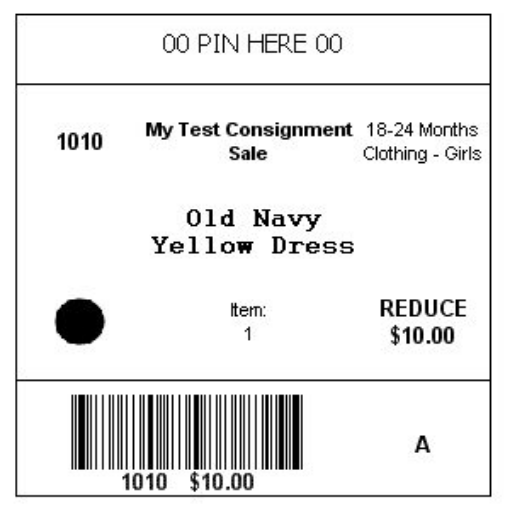
Once printed, your tags should match the sample shown on the site.
Step 7: Final Tagging Instructions
-
Review the category-specific tagging instructions below to ensure all items are properly prepared.